朗诵作品的后期制作 ZT 藤婵

[引用]
虽然朗诵和唱歌都需要用到专业软件cool edit pro,但是在声音的处理上还是有差别的,朗诵的处理相对要简单一些。下面我们看图说话:

1.噪音采样
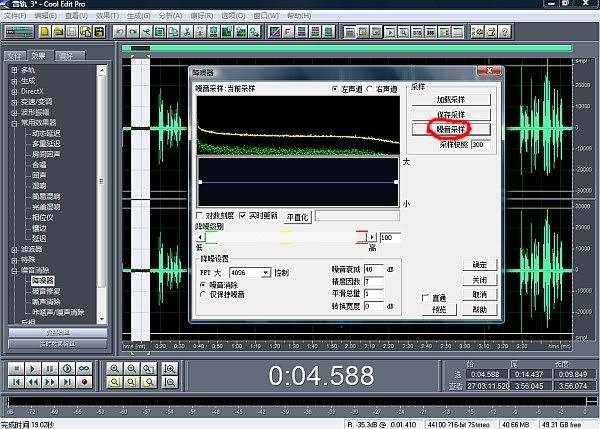


录制完的干声,里面都有一些杂音,清理掉,声音会更清晰。首先在单轨状态下,用鼠标选择开头一段空白,如图所示,点击左边功能栏里的“噪音消除”->“降噪器”,点击图中画红圈的“噪音采样”,此时图中的黄绿曲线就是噪音样品。然后点击“保存采样”,将样品保存下来。

2.去除噪音
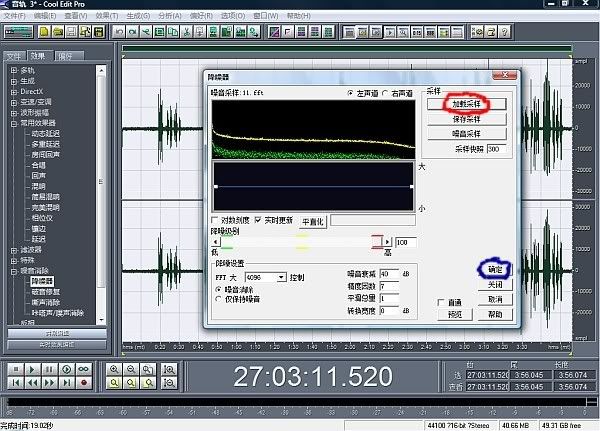


鼠标点击单轨声音,还原后,再点击左边功能里的“降噪器”,点击图中红圈“加载采样”,把刚才保存的样品打开,然后点击篮圈“确定”。

3.运行噪音消除
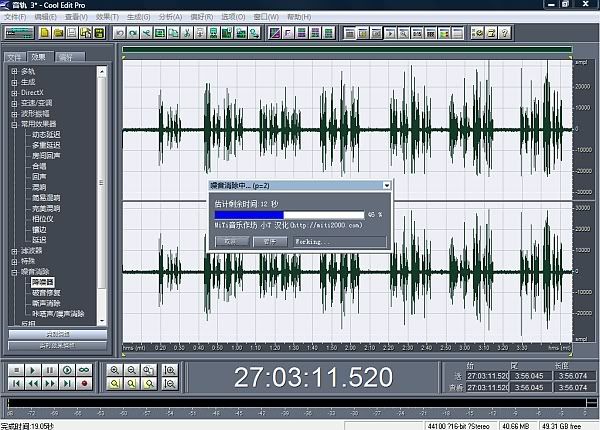


处理完后,你会发现声线中,空白部分的线变细了,说明噪音已去除干净,听自己的声音也十分清晰了。

4.美化声音
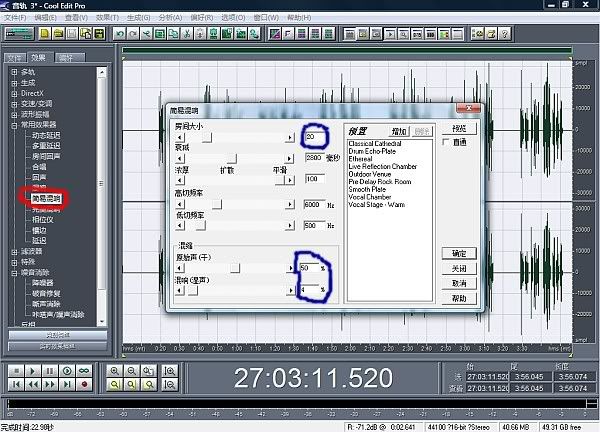


接下来就是给声音美容了,朗诵的美容很简单,在左边功能里找到“常用效果器”->“简易混响”,点击后弹出一个菜单,我们要修改的就是篮圈部分,一般我们录音的房间都不是很大,所以在“房间大小”里,选择20,最底下“混缩”部分,选择50、4,其中“4”是混响,这个根据各人的音质自己定,自己觉得好听就可以了。回音千万不能大,这个跟唱歌不一样。选完后,点击“确定”。

5.调整配乐和人声的音量
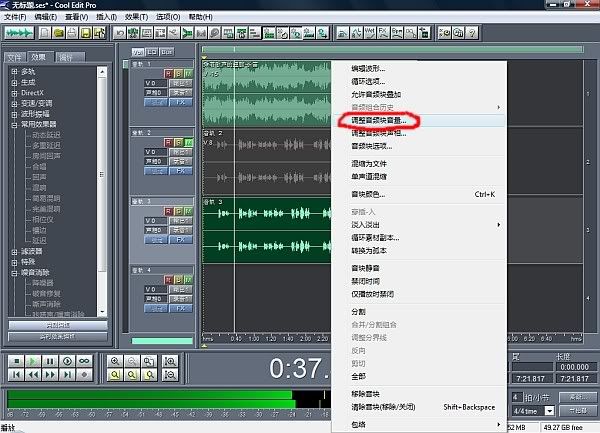


我们返回多轨状态,首先要压低背景音乐,朗诵作品要突出自己朗诵的声音,音乐作为陪衬就够了。调整音量时,把鼠标放到音乐或干声轨道上,右键弹出一个菜单,点击红圈“调整音频块音量”。
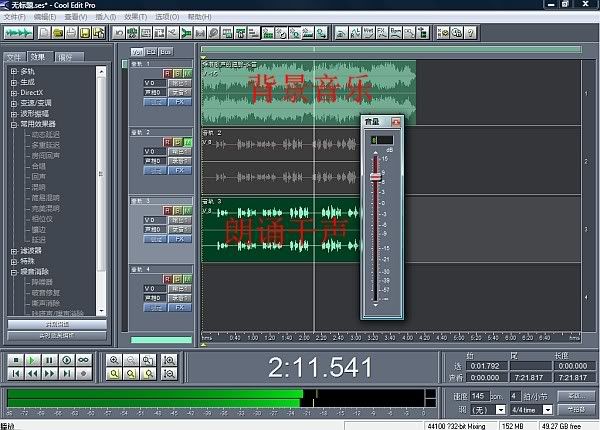


此时弹出音量滑杆,自己调整协调,混缩合成即可。用这种方法处理的声音,清晰圆润,不失真。

希望对大家有帮助,祝你们的朗诵更精彩
博主已关闭评论
Logo

Looks like your ad blocker is on.

×

We rely on ads to keep creating quality content for you to enjoy for free.

Please support our site by disabling your ad blocker.

Continue without supporting us

Choose your Ad Blocker

  • Adblock Plus
  • Adblock
  • Adguard
  • Ad Remover
  • Brave
  • Ghostery
  • uBlock Origin
  • uBlock
  • UltraBlock
  • Other
  1. In the extension bar, click the AdBlock Plus icon
  2. Click the large blue toggle for this website
  3. Click refresh
  1. In the extension bar, click the AdBlock icon
  2. Under "Pause on this site" click "Always"
  1. In the extension bar, click on the Adguard icon
  2. Click on the large green toggle for this website
  1. In the extension bar, click on the Ad Remover icon
  2. Click "Disable on This Website"
  1. In the extension bar, click on the orange lion icon
  2. Click the toggle on the top right, shifting from "Up" to "Down"
  1. In the extension bar, click on the Ghostery icon
  2. Click the "Anti-Tracking" shield so it says "Off"
  3. Click the "Ad-Blocking" stop sign so it says "Off"
  4. Refresh the page
  1. In the extension bar, click on the uBlock Origin icon
  2. Click on the big, blue power button
  3. Refresh the page
  1. In the extension bar, click on the uBlock icon
  2. Click on the big, blue power button
  3. Refresh the page
  1. In the extension bar, click on the UltraBlock icon
  2. Check the "Disable UltraBlock" checkbox
  1. Please disable your Ad Blocker
  2. Disable any DNS blocking tools such as AdGuardDNS or NextDNS

If the prompt is still appearing, please disable any tools or services you are using that block internet ads (e.g. DNS Servers).

Logo